Welcome To The Hacker Club 4U

On This Blog Now You can get knowledge about how to to do hacking and also Know how to prevent from hacking and know many tips And tricks of computer and internet

Hacking

Click Here To Know Many Tricks and Tips Of HACKING facebook,twitter and other accounts and passwords

Hacking Safety And Security

Click Here to know how to protect your computer and inetrnet from hacking and know hacking safety and security tips and tricks

Facebook And Twitter

Click On Picture For TWITTER And Click On This Tittle For FACEBOOK .Hacking And Security Tips Of facebook and twitter.Know how to byepass facebook login and twitter login

Gmail And Yahoo

Click On Above Picture For GMAIL Hacking And Security Tips . And.Click On This Title For YAHOO Hacking and security tips


Add Animated Fancy Navigation Menu with Jquery to Blogger / Blogspot

Animated Fancy Navigation Menu with Jquery for Blogger. Every One has trying to add a beautiful menu with animation effect by jquery to their Blogger Blogs. But it has very difficult to add a menu to blogger blogs. here is hackerclub has make it as simple and is like 1, 2, 3...
This menu is designed by Sohtanaka

Features:-
1. Simple and Easy to Installation
2. Nice Animation Effect and awesome look
3. Easy to add Links and use.

Watch Live Demo:-

  • BloggerBlogger
  • HarishHarish
  • Blogger Widgets Blogger Widgets

How to Install?
1. Go to Blogger Dashboard > Design tab.
2. Click on Add a Gadget any where in your Layout.
3. Choose LinkList Gadget and Leave Title Field as Blank
4. Try to Add Some Links and Save Gadget
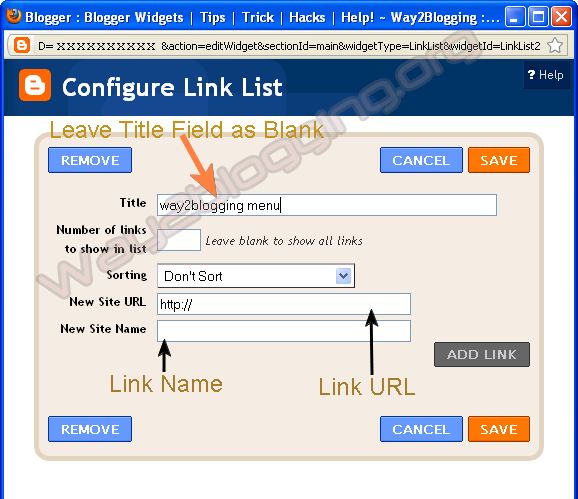

5. Edit LinkList Widget Once again, And Copy Widget ID From URL like in Image
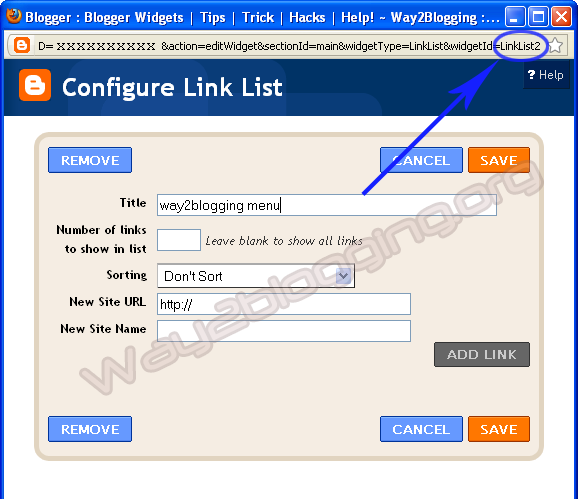
Make Sure the ID may Exact to match in the URL even a Block Letters(Capital Letters) Also for Perfect Working of This Widget!


http://www.blogger.com/rearrange?blogID=xxxxxx&action=editWidget&
sectionId=xxxx&widgetType=LinkList&widgetId=LinkList2
Here is LinkList2 is the widget ID in this URL

6. Use the below Form and Generate your Widget Code then Paste it before </head> tag in your template.


7. Save your template, You are Done!.

Put your Comments and Feelings About this Method of installation and about this Widget, So that i can implement  more widgets and menu's through this way! and also, share this Article with your Friends or to your Network :).

How To Add Blogger Popular Posts Widget With Zoom Effect / Using CSS


1.Login to your blogger dashboard--> Desing- -> Edit HTML
2.Scroll down to where you see ]]></b:skin> tag .

3.Copy below code and paste it just After ]]></b:skin> tag


<style type='text/css'>
.PopularPosts .item-title{display:none}
.PopularPosts .widget-content ul li{background:none repeat scroll 0 0 transparent; float:left; list-style:none outside none; margin:10px 0 0 !important; padding:0 !important}
.PopularPosts .item-thumbnail{margin:0 8px !important}
.item-thumbnail img{-moz-border-radius:10px; -webkit-border-radius:10px; border-radius:10px; -webkit-transition:all 0.5s ease; -moz-transition:all 0.5s ease; transition:all 0.5s ease; border:5px solid #666; height:40px; padding:3px; width:40px}
.item-thumbnail img:hover{border:5px solid #BBB; -moz-transform:scale(1.3) rotate(-5deg); -webkit-transform:scale(1.3) rotate(-5deg); -o-transform:scale(1.3) rotate(-5deg); -ms-transform:scale(1.3) rotate(-5deg); transform:scale(1.3) rotate(-5deg)}
</style>

Note: Please You first Add Popular Posts widget to Your Blogger Sidebar. (Blogger widgets list..)

4 Now Click on Save Template and You are Done..

Cheers.

How To Add Cool Floating Facebook Like and Stumble Upon Retweet Counters to Your Blogger


1.Login to your Bogger Dashboard and go to Desing >> & Page Elements.

2.Click on 'Add a Gadget' on the sidebar.

3.Select 'HTML/Javascript' and add the one of code given below


<div style="display:scroll; position:fixed; top:40%; left:2%; border: 1px dotted #E8E8E8; padding:0px 0px 0px  5px; height:220px; width:53px "> 
    <table cellpadding="1px" cellspacing="0"> 
    <tr> 
    <td style="border-bottom: 1px solid #E8E8E8; padding:5px 0 2px 0;"> 
    <iframe src="http://www.facebook.com/plugins/like.php?href=&quot; + data:post.url + &quot;&amp;layout=box_count&amp;show_faces=true&amp;width=50&amp; action=like&amp;font&amp;colorscheme=light&amp;height=65" scrolling="no" frameborder="0" style="border:none; overflow:hidden; width:50px; height:65px;" allowtransparency="true"></iframe> 
    </td> 
    </tr>
    <tr> 
    <td style="border-bottom: 1px solid #E8E8E8; padding:5px 0px;"> 
    <script src="http://www.stumbleupon.com/hostedbadge.php?s=5"></script> 
    </td> 
    </tr>
    <tr> 
    <td style="border-bottom: 0px solid #E8E8E8; padding:5px 0 0px 0;">
<a href="http://twitter.com/share" class="twitter-share-button" data-count="vertical" data-via="hackerclub4u">Tweet</a><script type="text/javascript" src="http://platform.twitter.com/widgets.js"></script> 
    </td> 
    </tr>
    </table> 
    </div>;


Note: Replace hackerclub4u with your twetter account name

4. Now Click on Save "Html Java Script" and You are done..

Cheers

Add Animated Flying Twitter Bird Widget to Blogger Blogs (Updated)

Flying Twitter Bird widgets for blogger, in my previous post i give this awesome widget and i am getting spectacular response from you. previously, the twitter bird has two types based on tweet text.
one is unique tweet text that you choose like "Blogger Widgets and Tricks - http://www.thehackerclub.blogspot.com" for all pages
and Second one is tweet text contains post title and post url, just like "How To Add Animated Flying Twitter Bird Widget For Blogger / Blogspot - http://thehacke3rclub.blogspot.com

Now i am giving another type, that is tweet text contains Current page title and Url, and is visible in all pages of your blog, for suppose you are in label page then the tweet text contains Label Name and URL


How to Install?
is Very Simple! just follow these steps...

  1. Change Your Twitter Account User Name.
  2. Copy The Bellow Widget Code.
  3. Go to Blogger Dashboard > Design > Edit HTML .
  4. Search For </body>tag and Place Widget Code Just Before it.
  5. Save your template.


<!-- Twitter Bird Widget for Blogger by Way2blogging.org -->
<script type="text/javascript" src="http://bloggerblogwidgets.googlecode.com/files/way2blogging.org-tripleflap.js">
</script>
<script type="text/javascript">
 var twitterAccount = "hackerclub4u";
 var tweetThisText = " <data:blog.pageTitle/> : <data:blog.url/> ";
 tripleflapInit();
</script>
<span style="font-size:11px;position:absolute;"><a title='Blogger Widget by Way2blogging.Org' href="http://www.way2blogging.org" target='_blank'>Blogger Widgets</a></span>
<!-- Twitter Bird Widget for Blogger by Way2blogging.org -->
NOTE=Replace hackerclub4u with your own twitter username
That's All!

How to Add a Falling Snow Effect To Blogger V4

1.Login to your blogger Dashboard and go to Desing --> Page Elements.

2.Click on 'Add a Gadget' on the sidebar.

3.Select 'HTML/Javascript' and add the one of code given below


<script src="http://thehackerclub.blogspot.googlecode.com/files/www.thehackerclub.blogspot.com-snow.txt" type="text/javascript">
/***********************************************
* Snow Effect without images-by Kurt Grigg at http://www.btinternet.com/~kurt.grigg/javascript
* Script featured available at Dynamic Drive at http://www.dynamicdrive.com/
* By THC (http://www.thehackerclub.blogspot.com)
* Please keep this notice intact
***********************************************/
</script>

4. Now Click On Save 'JavaScript' You are done.

How To Add Funny Dancing Twitter Flash Bird On Your Blog And Sites

How To Add Funny Dancing Flash Twitter Bird to Your Blog


1.Login to your Bogger Dashboard and go to Desing >> & Page Elements.

2.Click on 'Add a Gadget' on the sidebar.

3.Select 'HTML/Javascript' and add the one of code given below


<object type="application/x-shockwave-flash" data="http://www.buzzbuttons.com/BUTTON8/twitbutton.swf" width="200" height="200"><param name="movie" value="http://www.buzzbuttons.com/BUTTON8/twitbutton.swf"></param><param name="allowscriptaccess" value="always"></param><param name="menu" value="false"></param><param name="wmode" value="transparent"></param><param name="flashvars" value="username=bloggertoolz"></param><a href="http://www.dreambingo.co.uk/" title="http://www.dreambingo.co.uk/">http://www.dreambingo.co.uk/</a><embed src="http://www.buzzbuttons.com/BUTTON8/twitbutton.swf" type="application/x-shockwave-flash" allowscriptaccess="always" width="200" height="200" menu="false" wmode="transparent" flashvars="username=hackerclub4u"></embed></object>

Note: Replace hackerclub4u with your twetter account name

4. Now Click on Save "Html Java Script" and You are done..

Cheers

HAcking Tools (5)

Encryption Tools :-


GnuPG / PGP :- Secure your files and communication with the advanced encryption. PGP is the famous encryption program by Phil Zimmerman which helps secure your data from eavesdroppers and other risks. GnuPG is a very well-regarded open source implementation of the PGP standard (the actual executable is named gpg). While GnuPG is always free, PGP costs money for some uses.
http://www.gnupg.org/
http://www.pgp.com/


OpenSSL :- The premier SSL/TLS encryption library. The OpenSSL Project is a collaborative effort to develop a robust, commercial-grade, full-featured, and open source toolkit implementing the Secure Sockets Layer (SSL v2/v3) and Transport Layer Security (TLS v1) protocols as well as a full-strength general purpose cryptography library. The project is managed by a worldwide community of volunteers that use the Internet to communicate, plan, and develop the OpenSSL toolkit and its related documentation.
http://www.openssl.org/


Tor :- An anonymous Internet communication system Tor is a toolset for a wide range of organizations and people that want to improve their safety and security on the Internet. Using Tor can help you anonymize web browsing and publishing, instant messaging, irc, ssh, and other applications that use the TCP protocol. Tor also provides a platform on which software developers can build new applications with built-in anonymity, safety, and privacy features.
http://tor.eff.org/


Stunnel :- A general-purpose SSL cryptographic wrapper. The stunnel program is designed to work as an SSL encryption wrapper between remote client and local or remote server. It can be used to add SSL functionality to commonly used inetd daemons like POP2, POP3, and IMAP servers without any changes in the programs' code.
http://www.stunnel.org/


OpenVPN :- A full-featured SSL VPN solution. OpenVPN is an open-source SSL VPN package which can accommodate a wide range of configurations, including remote access, site-to-site VPNs, WiFi security, and enterprise-scale remote access solutions with load balancing, failover, and fine-grained access-controls. OpenVPN implements OSI layer 2 or 3 secure network extension using the industry standard SSL/TLS protocol, supports flexible client authentication methods based on certificates, smart cards, and/or 2-factor authentication, and allows user or group-specific access control policies using firewall rules applied to the VPN virtual interface. OpenVPN uses OpenSSL as its primary cryptographic library.
http://openvpn.net/


TrueCrypt :- Open-Source Disk Encryption Software for Windows and Linux. TrueCrypt is an excellent open source disk encryption system. Users can encrypt entire filesystems, which are then on-the-fly encrypted/decrypted as needed without user intervention beyond entering their passphrase intially. A clever hidden volume feature allows you to hide a 2nd layer of particularly sensitive content with plausible deniability about whether it exists. Then if you are forced to give up your passphrase, you give them the first-level secret. Even with that, attackers cannot prove that a second level key even exists.
http://www.truecrypt.org/

Recommend us on Google!

Share

Twitter Delicious Facebook Digg Stumbleupon Favorites More