Welcome To The Hacker Club 4U

On This Blog Now You can get knowledge about how to to do hacking and also Know how to prevent from hacking and know many tips And tricks of computer and internet

Hacking

Click Here To Know Many Tricks and Tips Of HACKING facebook,twitter and other accounts and passwords

Hacking Safety And Security

Click Here to know how to protect your computer and inetrnet from hacking and know hacking safety and security tips and tricks

Facebook And Twitter

Click On Picture For TWITTER And Click On This Tittle For FACEBOOK .Hacking And Security Tips Of facebook and twitter.Know how to byepass facebook login and twitter login

Gmail And Yahoo

Click On Above Picture For GMAIL Hacking And Security Tips . And.Click On This Title For YAHOO Hacking and security tips


FIX 50 ERRORS ON WINDOWS VISTA WINDOWS 7

FixWin is a software utility that use to correct 50 errors in Windows Vista and Windows 7 for free. This software works only in minutes, depending on the type of error on windows 7 and vista.

Several types of errors such as:

1. Recycle Bin can not be cleaned normally

2. Right-click menu does not appear in the browser Internet Explorer from the contextual menu is disabled by windows

3. Windows Media Center can not update the database, or there is no confirmation dialog box when deleting files

4. Task Manager, Registry Editor CMD or inactive.

5. and so forth.

By using the FixWin Utility, the problems on windows vista and windows 7 can be overcome.

In the software there are several categories of errors such as Windows Explorer, Internet: Connectivity, Windows Media, System Tools & Misc Additional Fixes.

Download Fix Win

CLICK ON SUBSCRIBE BUTTON PLZ!

How to Make a Simple Antivirus With Notepad In Simple Steps


The Notepad antivirus in action
The Notepad antivirus in actionAre you too lazy or you don't want to spend money for an antivirus software? Don't worry, because you can make one with Notepad just by copy-pasting a simple code! Read on if you want to try.


  1. Open Notepad

  2. 2
    Type in the code shown in the next step(if you want, change the parts that say "Antivirus" and "Your name" into the name you want the AV to be called and "Your name" into your real name (e.g. John Smith):
  3. 3
    echo off.
    echo off.
    @echo off
    • title Antivirus
    • echo Antivirus
    • echo created by your name
    •  :start
    • IF EXIST virus.bat goto infected
    • IF NOT EXIST virus.bat goto clean
    • cd C:\Windows\system32
    •  :infected
    • echo WARNING VIRUS DETECTED!
    • del virus.bat
    • pause
    • goto start
    •  :clean
    • echo System secure!
    • pause
    • exit
  4. 4
    Change the "Save as type" section into "All Files," with the file name being [insert your antivirus name here].bat
  5. 5
    (You have to put .bat)
  6. 6
    Find the file and open it. You will see a Command Prompt Window doing a scan.
  7. 7
    Enjoy!


Warnings
  • You can't entirely rely on this. If you want, you can download a real antivirus from the Internet (like Norton, AVG, Avast, etc.)


Things You'll Need

  • A computer running any Windows operating system
Click On Subscribe Button Plz!

CREATE ANTI VIRUS WITH NOTEPAD


There are simple ways to clean viruses in our computers. We can make your own antivirus with software built using the Windows named Notepad. Apart from minor product files, notepad can save files to a variety of other applications programs, such as html, java script and so on.

However, the virus that can be eliminated by our anti-virus is only a low level as macro viruses and an equal. For heavy virus, would have to use anti-virus that is more powerful. However, these tutorials can teach you the basic knowledge about how the anti-virus.

Type the following code into Notepad:

@ echo off
echo off turn off the active virus
taskkill / F / IM virusname1.exe / IM virusname2.exe
echo Deleting all of viruses based on size
for / RC: \%% a in (*. exe) do if%% ~ za 157,184 equ del / A: HSRA "%% a"
echo deleting hidden virus
echo for drive c and subfolders
for / R C: \%% a in (*. doc.exe) do del "%% a"
echo for drive d and subfolders
for / R D: \%% a in (*. doc.exe) do del "%% a"
echo Unhide Document
cd / d c: \
echo for drive C and subfolders
*. doc attrib-H-S-A / S
cd / d d: \
echo for drive D and subfolders
*. doc attrib-H-S-A / S
exit


Save the file with bat extension, For example antivirus.bat. then go to command prompt and run the Notepad file.

Don't Forget To Click On Subscribe Button Plz!

The History of the Zipper

Today, 24th of April 2012, Google is celebrating the legacy of Gideon Sundback.  From the  Google ‘zipper’ Doodle it is easy to determine that the logo has something to do with clothing or with the zipper itself.
Gideon Sundback
This is indeed the case and today the Google Doodle is commemorating Gideon Sundback’s achievement.


Whitcomb JudsonGideon Sundback
Photos: Inventors
Whitcomb Judson Gideon Sundback


zipper
Illustration: drawing of a modern zipper

More of This Feature
View the original 1917 Sundback patent for the "Separable Fastener"
Related Innovations
Clothing
Clothing Fasteners

It was a long way up for the humble zipper, the mechanical wonder that has kept so much in our lives 'together.' On its way up the zipper has passed through the hands of several dedicated inventors, none convinced the general public to accept the zipper as part of everyday costume. The magazine and fashion industry made the novel zipper the popular item it is today, but it happened nearly eighty years after the zipper's first appearance.


Elias Howe, who invented the sewing machine received a patent in 1851 for an 'Automatic, Continuous Clothing Closure.' Perhaps it was the success of the sewing machine, which caused Elias not to pursue marketing his clothing closure. As a result, Howe missed his chance to become the recognized 'Father of the Zip.'
Forty-four years later, Mr. Whitcomb Judson (who also invented the 'Pneumatic Street Railway') marketed a 'Clasp Locker' a device similar to the 1851 Howe patent. Being first to market gave Whitcomb the credit of being the 'Inventor of the Zipper', However, his 1893 patent did not use the word zipper. The Chicago inventor's 'Clasp Locker' was a complicated hook-and-eye shoe fastener. Together with businessman Colonel Lewis Walker, Whitcomb launched the Universal Fastener Company to manufacture the new device. The clasp locker had its public debut at the 1893 Chicago World's Fair and met with little commercial success.
Whitcomb Judson's Clasp Locker
Illustration: Whitcomb Judson's clasp locker
Swedish-born (who later immigrated to Canada), Gideon Sundback, an electrical engineer, was hired to work for the Universal Fastener Company. Good design skills and a marriage to the plant-manager's daughter Elvira Aronson led Sundback to the position of head designer at Universal. He was responsible for improving the far from perfect 'Judson C-curity Fastener.' Unfortunately, Sundback's wife died in 1911. The grieving husband busied himself at the design table and by December of 1913, he had designed the modern zipper.
Gideon Sundback increased the number of fastening elements from four per inch to ten or eleven, had two facing-rows of teeth that pulled into a single piece by the slider, and increased the opening for the teeth guided by the slider. The patent for the 'Separable Fastener' was issued in 1917. Sundback also created the manufacturing machine for the new zipper. The 'S-L' or scrapless machine took a special Y-shaped wire and cut scoops from it, then punched the scoop dimple and nib, and clamped each scoop on a cloth tape to produce a continuous zipper chain. Within the first year of operation, Sundback's zipper-making machinery was producing a few hundred feet of fastener per day.
View the original 1917 Sundback patent for the "Separable Fastener"
The popular 'zipper' name came from the B. F. Goodrich Company, when they decided to use Gideon's fastener on a new type of rubber boots or galoshes and renamed the device the zipper, the name that lasted. Boots and tobacco pouches with a zippered closure were the two chief uses of the zipper during its early years. It took twenty more years to convince the fashion industry to seriously promote the novel closure on garments.
In the 1930's, a sales campaign began for children's clothing featuring zippers. The campaign praised zippers for promoting self-reliance in young children by making it possible for them to dress in self-help clothing. The zipper beat the button in the 1937 in the "Battle of the Fly," when French fashion designers raved over zippers in men's trousers. Esquire magazine declared the zipper the "Newest Tailoring Idea for Men" and among the zippered fly's many virtues was that it would exclude "The Possibility of Unintentional and Embarrassing Disarray." Obviously, the new zippered trouser owners had not yet discovered the experience of forgetting to zip-up.
The next big boost for the zipper came when zippers could open on both ends, as on jackets. Today the zipper is everywhere, in clothing, luggage and leather goods and countless other objects. Thousands of zipper miles produced daily, meet the needs of consumers, thanks to the early efforts of the many famous zipper inventors.


Gideon Sundback Tribute By Google Through ‘Zipper Doodle’

Have you seen the latest, coolest, awesomest Google ‘Zipper’ Doodle? If not, head over to www.Google.com and unzip the page! Google’s engineers have put up an awesome doodle to celebrate the birthday of Er. Gideon Sundback – an electrical engineer who developed the zipper! Yep, Sundback was a Swedish-American electrical engineer! Between 1906 and 1914, Sundback made lot of advances in the development of the zipper. His main aim was to improve the “Judson C-curity Fastener”. Plako was the first improvement of the C-curity, but it had its own set of problems. Sundback found his final solution to the problem in 1913. He increased the number of fastening elements from 4 per inch to about 10 or 11 per inch. The improved version of the zipper was finally released in 1914.Interestingly, the word ‘Zipper’ wasn’t coined by Sundback. It came from B.F. Goodrich who decided to use it in their new boots.
Gideon Sundback Google Doodle
Gideon Sundback
Check out more information about Er. Sundback on Wikipedia or Invent Hall Of Fame. We thank Google for the lovely doodle and remembering yet another engineer who changed the world, forever. Proud to be an engineer!
Image Credit: Concordia

Gideon Sundback celebrated in a Google doodle

Latest doodle is a giant zipper running down the search engine's homepage marking the birthday of the zip's inventor.
Google doodle zipper
Gideon Sundback celebrated with an interactive zipper Google doodle on the search engine's homepage. Photograph: Screengrab
Google's latest doodle, a giant zipper running down the centre of the search engine's homepage, marks the birthday of Gideon Sundback, the Swedish-American electrical engineer most commonly associated with the development of the fastening device that revolutionised the clothing industry.
Before Sundback's intervention, the idea for a fastener based on interlocking teeth had circulated among engineers for more than 20 years but no one had perfected it.
His innovation was to place a dimple on the underside of each tooth and a nib on the top that would sit securely within the dimple of the tooth above it.
As a result, the join between two rows of teeth was then strong because no single tooth has enough room to move up or down and come apart. He also created the manufacturing machine for the new zipper.
Born on April 24, 1880, in Småland, Sweden, he moved to Germany following his studies and emigrated in 1905 to the US, where he started to work at Westinghouse Electric and Manufacturing Company in Pittsburgh, Pennsylvania.
A year later, he was hired to work for the Universal Fastener Company in Hoboken, New Jersey, and became its head designer in 1909.
Sundback initially proposed the new zipper as a replacement for hook-and-eye fasteners on women's boots but it had become a regular feature for the flies of trousers and on dresses by the 1930s.
Sundback died of a heart condition in 1954 and was interred at Greendale cemetery in Meadville, Pennsylvania.

Free Facebook Access From any Mobile In India Without Internet

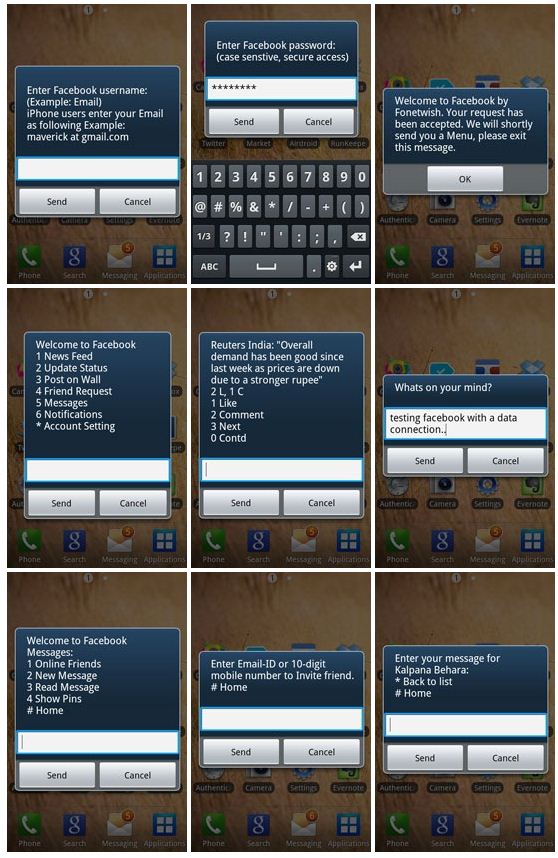
Facebook has become the largest social network on this earth and day to day many people are joining Facebook for connecting with family, friends who are far away from their home. Facebook is becoming the most popular social network for chatting with family and friends, share the knowledge, exposure of any event, talk without any talk, building subscribers for business. If we talk about the registered user by countries then India has become the second largest country in the world whose people are registered with Facebook. Now Facebook has decided to attract more users from India and Facebook India has partnered with Fonetwish by which you can access your Facebook for free without any internet connection without any form of data ( EDGE/WCDMA/HSPA(3G)). You can use your Facebook in the mobile even in Nokia 1100 or no need to have any multimedia mobile or inbuilt any apps. Fonetwish has started this free Facebook access service to Airtel, Idea, Aircel and Tata Docomo users only and may be brings it to other networks. Now here is how to access free Facebook without internet connection in India.


Browse Facebook For Free In India On Mobile Phones


  1. If you are a Airtel/Aircel/Idea or Tata Docomo user, then proceed the below steps and if you are network user then wait for some days to launch this service.
  2. Dial *325# from your mobile phone and wait for a while.
  3. Enter your username and password, now are in your Facebook account.
  4. Choose the number what you want to be, for example if you want to update your status update then choose 2 and go for write and update like the below preview. Take a complete look in the preview,

free facebook access in india
Free Facebook Access Screenshot taken from labnol.org
I personally used this service and have a good experienced without any problem and hope you would also like these feature into your mobile phones. You can also check who are online and chat them and also you could get direct dial number to chat with individual friend, if you are outside of your Facebook account, just you have to dial no. and message them. Using this unlimited service have minor charges, just you have to pay only Rs. 1.00/day and use this feature unlimited.

IF THIS TRICK IS HELPFUL FOR YOU THAN DON'T FORGET TO SUBSCRIBE US FOR MORE UPDATES !
Click On Subscribe Button......!

Recommend us on Google!

Share

Twitter Delicious Facebook Digg Stumbleupon Favorites More