Welcome To The Hacker Club 4U

On This Blog Now You can get knowledge about how to to do hacking and also Know how to prevent from hacking and know many tips And tricks of computer and internet

Hacking

Click Here To Know Many Tricks and Tips Of HACKING facebook,twitter and other accounts and passwords

Hacking Safety And Security

Click Here to know how to protect your computer and inetrnet from hacking and know hacking safety and security tips and tricks

Facebook And Twitter

Click On Picture For TWITTER And Click On This Tittle For FACEBOOK .Hacking And Security Tips Of facebook and twitter.Know how to byepass facebook login and twitter login

Gmail And Yahoo

Click On Above Picture For GMAIL Hacking And Security Tips . And.Click On This Title For YAHOO Hacking and security tips


How to Close All Tabs From The Same Website In Firefox and Chrome

Many times while I am working online no matter if I am researching on Wikipedia, browsing Facebook pages or shopping for my next gadget, I often end up opening many pages of the same website. Opening multiple tabs helps my work go faster, but after I am done, I feel like closing all of them at once.
Indeed there are option in browsers like “Close tabs on the right” or “Close all but active,” but none of these solves the exact problem I have. If you are a Firefox or Chrome user, you can install the below mentioned add-ons to get this necessary feature right away.

Firefox Users

TabCloser is a simple add-on for Firefox, which integrates the feature to close all the tabs related to a single domain. If you are browsing through Firefox, download and install the TabCloser add-on and restart your browser.
firefox tab closer
Now, next time you launch Firefox, you will see an added option to the context menu when you right click on any of the active tabs. The option will be to “Close all <x> (hostname) tabs” where (hostname) is the name of the website that’s open and <x> is the no of tabs for the domain.
A dialog box will show up to confirm the action, and once authorized, all your selected tabs will be closed instantly.

Chrome Users

Close all tabs from a site is a nifty extension for Chrome, which adds an option to close the current tab, and all other tabs from the same site. Just download and install the add-on to Chrome and next time you want to complete that task just right click on any open page from the specific domain and select close other tabs from this site.
chrome tab closer
Note: Developer has modified the above add-on to introduce an option to close non-active other tabs from the same site leaving the one with focus.

Conclusion

These add-ons indeed come in very handy when you have to close too many open tabs from a specific website instantly. The only problem I see is that, if all the pages you have opened is from a single domain then the use of these add-on will close the browser all together.

Stardock Gives You a Windows 8 Appbar Experience

If you have a lot of applications and windows open at a time and find it difficult to manage them, navigate through or minimize/maximize, Windows 8 has a perfect solution for you. However, not all of us will get a chance to experience this until Windows 8 is publicly released.
One way to try out some of the Windows 8 features is to use Stardock. It emulates the Windows 8 metro interface and adds in a visual bar of apps onto the side of your screen.

First Things First

Stardock has a beautiful interface and is just perfect to manage tabs of open applications. Apart from this, it allows us to tile lists of application that we frequently use for quick access. Follow the link to download and install Stardock. When you are done and launch the application for the first time, it shows a how to use page.
This is a great summary of the tool. You may scroll the list up/down, scroll pages right/left and more.
By default, the visual bar shows two pages named “apps” and “my tiles”. The former will show all open application and windows while the latter is configurable to add in links to other apps and folders.

How to Use Stardock?

The startup page says a lot. It also shows a list of tips to help you. You may again look at these by right clicking on the appbar. For every open window, the bar will show a preview. You may hit on any one to open or hit the cross to close it. To pull in an app drag and drop it and the page.
There are a couple of right click options. The top of the bar, where the page name resides, will show options to rename, delete or configure the behavior of a page.
A right click on any window preview will provide options to close, minimize or restore the window. The option on recent documents shows the list of documents opened recently.
Doing the same on a tiled application will show a shortcut link, unpin and rename options.
Right clicking on a blank space will let you configure the entire appbar or launch tips and how to use pages.

Configuration and Settings

Stardock Tiles have four basic configurable settings. With pages, you may defer page settings or edit existing profiles. There is a list of appearance settings like colors, icon, caption etc. Then, the size and location option lets you place the bar on any of the four edges and lets you choose the bar size ranging between tiny to extra large.

Conclusion

Stardock is a good app to try if you want to get a preview of the Windows 8 metro interface. In addition to that, it is a solid app management application.

How To Create My Own Web Page Using Html Code

Creating a simple webpage in HTML. Before you start coding, let me assume the following facts,
You know simple html tags like, HTML, BODY, TITLE, HEAD, TABLE, LISTS, etc. and some parameters like, WIDTH, HEIGHT, COLOR, BORDER, CELLSPACING, PADDING, etc.
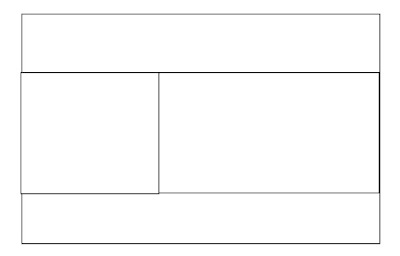
Lets make a simple HTML page format as below:

To do so, we’ll be using TABLE, H1,H2, FONTS, HYPERLINKS, LISTS, HR etc.
Open up the notepad save it as “webpage.html” (with quotes)
And then create a table with similar format:

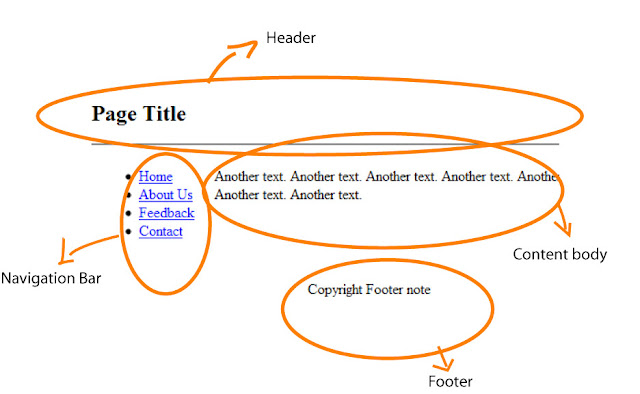
Your page will contain Page header, Navgation bar, Footer, Contents part.
To create a table similar to the format above, use the following tags.
<html>
<head>
<title>Page title</title></head>
<table width=”100%” cellpadding=”10″>
<tr width=”100% valign=”top”><h2> PAGE HEADER </h2>
<td width=”20%” valign=”top”>
NAVIGATION BAR
</td>
<td width=”80%” valign=”top”>
CONTENTS PART
</td>
<tr width=”100%” valign=”top”>FOOTER PART</tr>
</html>
Now you have the basic layout ready. The things we need now is to fill the blank tables with appropriate contents.
For example:
<html>
<body>
<table width=”100%” cellpadding=”10″>
<!– page title ->
<tr width=”100% valign=”top”><h2>Page Title</h2>
<!– end of page title ->
<hr>
</tr>
<tr>
<!– Navigation bar ->
<td width=”20%” valign=”top”>
<ul>
<li><a href=”#”>Home</a></li>
<li><a href=”#”>About Us</a></li>
<li><a href=”#”>Feedback</a></li>
<li><a href=”#”>Contact</a></li>
</ul>
</td>
<!– End of Navigation ->
<!– Body Contents ->
<td width=”80%” valign=”top”>
YOUR Contents goes here, type your text, insert hyperlinks, lists, images here to beautify your web page.
</td>
<!– End of contents ->
</tr>
</table>
<!– footer notes ->
<tr width=”100%” valign=”top”><p align=”center”>Copyright Footer note</P></tr>
<!– end of footer notes ->
</body>
</html>
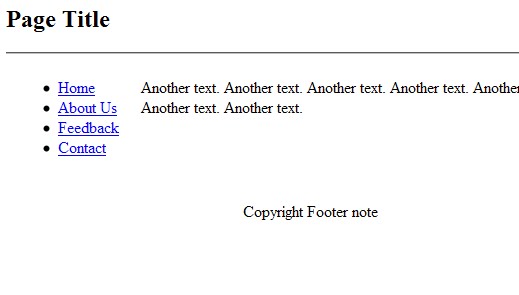
The above code will give output in your browser as we’ve planned to (see the first image). Playing with the tags makes you further clear and adapted to web designing using HTML.

Adding images and other hyperlinks.
After making simple page, you can add images, colored fonts, hyperlinks etc to make it more user friendly.
You can use <a href=”#”> and <img src=”#”/> tags to include hyper links and images.
See the example below(put it under the content body tag):
<a href=”http://www.google.com”>
<img border=”0″ src=”http://www.google.com.np/intl/en_com/images/logo_plain.png”/>
</a>
<h3>is the most popular search engine in this world.</h3>
<br/>
<a href=”http://www.google.com”>Click here</a> to go to Google.com
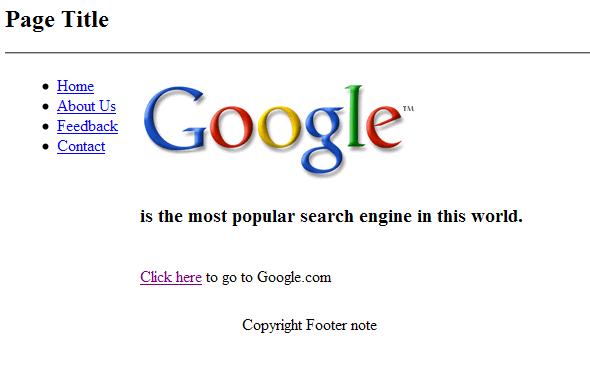
In the above example, Google’s logo image will be loaded using, <img> tag and that tag is enveloped under <a href> tag which enables the image to be clicked.
Similarly you can envelope text to create hyperlinks.
You can also change the size and font colors by applying the following syntax.
<FONT COLOR=”color_name” size=”size_in_number”>FONT TO BE FORMATED</FONT>

To create lists of texts or navigation,
Example:
<ul>
<li><a href=”#”>Home</a></li>
<li><a href=”#”>About Us</a></li>
<li><a href=”#”>Feedback</a></li>
<li><a href=”#”>Contact</a></li>
</ul>
<ul> tag creates a list block and <li> lists them in proper line break. In above example, we’ve listed the text with hyperlinks.
After tweaking and playing with the tags you may get the good result.
For instance take the sample from below:
<html>
<body>
<table width=”100%” cellpadding=”10″>
<!– page title ->
<tr width=”100% valign=”top”><h2>Page Title</h2>
<!– end of page title ->
<hr>
</tr>
<tr>
<!– Navigation bar ->
<td width=”20%” valign=”top”>
<ul>
<li><a href=”#”>Home</a></li>
<li><a href=”#”>About Us</a></li>
<li><a href=”#”>Feedback</a></li>
<li><a href=”#”>Contact</a></li>
</ul>
</td>
<!– End of Navigation ->
<!– Body Contents ->
<td width=”80%” valign=”top”>
<a href=”http://www.google.com”><img border=”0″ src=”http://www.google.com.np/intl/en_com/images/logo_plain.png”/></a><h3>
is the most popular search engine in this world.</h3>
<br/>
<a href=”http://www.google.com”>Click here</a> to go to <Font color=”green” size=“2”>Google.com</font>
</td>
<!– End of contents ->
</tr>
</table>
<!– footer notes ->
<tr width=”100%” valign=”top”><p align=”center”>Copyright Footer note</P></tr>
<!– end of footer notes ->
</body>
</html>
It will show you the page like this:

Hope this tutorial gave you some basic idea of designing webpage using notepad and HTML.

How To Make Your Own Dynamic Home Page Using PHP

we are going dynamic, i.e. every part of your web page, header, footer, body, menu, etc are going to change dynamically. To do so we are going to load separate html file in a single html page.
Refer to the chart below for more clarification.


Index.php is the main page which must be loaded by the visitor. Header.html, menu.html, post.html are the Head banner, Menu bar and Posts/articles respectively in separate HTML file. Whilist style.css is the CSS style for all the pages that will be loading in index.php.
Simply we’ll load all the files in index.php.
Let’s start designing the layout for index.php using HTML.
<html>
<head>
<title> Page 1 </title>
</head>
<body>
Header for the web page
<!– Table for Main Body –>
<table border=”0″ width=”100%” cellspacing=”0″ cellpadding=”2″>
<tr>
<td valign=”top” align=”left” width=”90″>
Menu bar at top for page
</td>
<td width=”1″ bgcolor=”lightskyblue” valign=”top”>  </td>
<td valign=”top”>
Main content or article for your home page.
<br> <br>
Same menubar at bottom
</td>
<td width=”1″ bgcolor=”lightskyblue” valign=”top”>   </td>
</tr></table>
</body></html>
I used simple technique of tables to layout the index.php.
Now the layout is ready and we got the maps to assign the specific header, post, menus etc.
Let’s assign the specific file to the specific address.
<html>
<head>
<title> Home Page </title>
<link rel=”stylesheet” href=”style.css”/>
</head>
<body>
<?php
include (“header.html”);
?>

<!– Table for Main Body –>
<table border=”0″ width=”100%” cellspacing=”0″ cellpadding=”2″>
<tr>
<td valign=”top” align=”left” width=”90″>
<?php
include (“menu.html”);
?>

</td>
<td width=”1″ bgcolor=”lightskyblue” valign=”top”>  </td>
<td valign=”top”>
<?php
include (“post.html”);
?>

<br> <br>
<?php
include (“menu.html”);
?>

</td>
<td width=”1″ bgcolor=”lightskyblue” valign=”top”>   </td>
</tr></table>
</body></html>
You can see two differences from the HTML code before and after.
First difference is, <link rel=”stylesheet” type=”text/css” href=”style.css”/> which must lie inside the <head> tag.

What it actually does is, loading the CSS style to index.php.
It’s syntax is:
<link rel=”stylesheet” type=”text/css” href=”#”/>
‘#’ refers to the location of your stylesheet document.
Another is four blocks of code:
<?php
include (“XXX”);
?>

The above code loads the specific html/php or web file wherever it is placed, it is actually a php code that’s why it is enclosed in <?php ….?> or <?….. ?>
We’ve used include (); function to call the specific file, where XXX in the example above refers to the location of the file.
Note: If all the files including sub-files contains in same directory, you don’t need to mention the URL of the file, else you must define the exact location for it.

We’ve basic layout for homepage ready. All we need is the sub-pages.
Design a good banner for your homepage using Photoshop or other Image editing software.
Create new text document with following inputs in it:
<img src=”image/banner.jpg” border=”0”/>
Save it as header.html.
Create another text file with following inputs:
<a href=”index.php”>Home </a> |
<a href=”page2.php”>Page</a> |
<a href=”page3.php”>About us</a> |
<a href=”page4.php”>Contact</a>
Save it as menu.html.
Now create a another text document where your contents will be loaded,
For example,
<h2> H2 heading for the page </h2>
Here goes the main content of your web page. You can include any information about your page here.
Example for a horizontal line = <hr>
Example using ‘class’ = ‘note’:
<span> Example using ‘class’ = ‘note’ </span>
Now let’s put in an image (that is in the same folder as this file so we don’t have to put the full path / URL
<img src=”images/anyimage.jpg” border=”0″ width=”100″ height=”65″ alt=”alternate_text”>
Save the above example as post.html
Now you have all the contents ready. Anything left is the styling part.
You can also create your own style in another text document and save it as filename.css (in this tutorial we’ll call it style.css).
Copy the code and paste it in stye.css that you’ve just created.
body {
background-color: #FFFFFF;
font-family: Arial, Verdana, sans-serif;
font-size: 18px;
}
a { font-family: Arial, Verdana, sans-serif; font-size: 18px; color: #483D8B; text-decoration: underline}
a:hover { font-family: Arial, Verdana, sans-serif; font-size: 18px; color: #000000; background-color: #FAEBD7}
h1 { font-family: Arial, Verdana, sans-serif; font-size: 36px; color: #000000 }
h2 { font-family: Arial, Verdana, sans-serif; font-size: 24px; color: #000000 }
h3 { font-family: Arial, Verdana, sans-serif; font-size: 24px; color: #000000 }
h4 { font-family: Arial, Verdana, sans-serif; font-size: 18px; color: #000000 }
h5 { font-family: Arial, Verdana, sans-serif; font-size: 12px; color: #000000 }
h6 { font-family: Arial, Verdana, sans-serif; font-size: 8px; color: #000000 }
hr{ color:brown; background-color:tan; width:90%; height:2px; }
table { font-family: Arial, Verdana, sans-serif; font-size: 18px; color: #00008B; margin-top: 0px; margin-right: 0px; margin-bottom: 0px; margin-left: 0px; padding-top: 0px; padding-right: 0px; padding-bottom: 0px; padding-left: 0px}
.note { font-family: Arial, Verdana, sans-serif; font-size: 14px; color: purple;
font-weight: bold;}
Save it in style.css.
I’ve applied the styling for only body, horizontal rule(hr), table and custom class named note.
Your final page will have the format similar to below:

You can add and replace the menu.html and other without opening index.php this is what makes your page handling experience some what dynamic.
Hope you liked this tutorial.

Top 10 Ways How Hackers Can Hack Facebook Accounts In 2011

13
Facebook is one of the most widely used social networking site with more than 750 million users, as a reason if which it has become the number 1 target of hackers, I have written a couple of post related to facebook hacking here at THC4U, In my previous post which I wrote in 2010 related to facebook hacking and security 4 ways on How to hack facebook password, I mentioned the top methods which were used by hackers to hack facebook accounts, however lots of things have changed in 2011, Lots of methods have went outdated or have been patched up by facebook and lots of new methods have been introduced, So in this post I will write the top 10 methods how hackers can hack facebook accounts in 2010.


10 Ways How Hackers Can Hack Facebook Accounts In 2011

So here are the top 10 methods which have been the most popular in 2011:


1. Facebook Phishing 


Phishing still is the most popular attack vector used for hacking facebook accounts, There are variety of methods to carry out phishing attack, In a simple phishing attacks a hacker creates a fake login page which exactly looks like the real facebook page and then asks the victim to login into that page, Once the victim logins through the fake page the victims "Email Address" and "Password" is stored in to a text file, The hacker then downloads the text file and get's his hands on the victims credentials.

I have explained the step by step phishing process in my post below:

2. Keylogging 

Keylogging, according to me is the easiest way to hack a facebook password, Keylogging sometimes can be so dangerous that even a person with good knowledge of computers can fall for it. A keylogger is basically a small program which once is installed on victims computer will record every thing which victim types on his/her computer. The logs are then send back to the attacker by either FTP or directly to hackers email address. I have dedicated a half of my newsest book "An introduction to keyloggers, RATS And Malware" to this topic.

Ethical Hacking Book
3. Stealers 


Almost 80% percent people use stored passwords in their browser to access the facebook, This is is quite convenient but can sometimes be extremely dangerous, Stealers are software's specially designed to capture the saved passwords stored in the victims browser, Stealers once FUD can be extremely powerful. If you want to how stealers work and how you can set up your own one?, Kindly refer the book above.


4. Session Hijacking


Session Hijacking can be often very dangerous if you are accessing Facebook on a http:// connection, In a Session Hijacking attack a hacker steals the victims browser cookie which is used to authenticate a user on a website and uses to it to access victims account, Session hijacking is widely used on Lan's. I have already written a three part series on How session hijacking works? and also a separate post on Facebook session hijacking.


5. Sidejacking With Firesheep


Sidejacking attack went common in late 2010, however it's still popular now a days, Firesheep is widely used to carry out sidejacking attacks, Firesheep only works when the attacker and victim is on the same wifi network. A sidejacking attack is basically another name for http session hijacking, but it's more targeted towards wifi users.

To know more about sidejacking attack and firesheep, read the post mentioned below:

6. Mobile Phone Hacking


Millions of Facebook users access Facebook through their mobile phones. In case the hacker can gain access to the victims mobile phone then he can probably gain access to his/her Facebook account. Their are lots of Mobile Spying softwares used to monitor a Cellphone.

The most popular Mobile Phone Spying softwares are:

1. Mobile Spy
2. Spy Phone Gold

7. DNS Spoofing 


If both the victim and attacker are on the same network, an attacker can use a DNS spoofing attack and change the original facebook.com page to his own fake page and hence can get access to victims facebook account.


8. USB Hacking 

Usb password stealer
If an attacker has physical access to your computer, he could just insert a USB programmed with a function to automatically extract saved passwords in the browser, I have also posted related to this attack which you can read by accessing the link below:
9. Man In the Middle Attacks


If the victim and attacker are on the same lan and on a switch based network, A hacker can place himself b/w the client and the server or he could also act as a default gateway and hence capturing all the traffic in between, ARP Poisoning which is the other name for man in the middle attacks is a very broad topic and is beyond the scope of this article, We have written a couple of articles on man in the middle attacks which canb be accessed from the links mentioned below:
If you are really interested in learning how man in the middle attacks, you can view the presentation below by oxid.it.

10. Botnets 


Botnets are not commonly used for hacking facebook accounts, because of it's high setup costs, They are used to carry more advanced attacks, A botnet is basically a collection of compromised computer, The infection process is same as the keylogging, however a botnet gives you, additional options in for carrying out attacks with the compromised computer. Some of the most popular botnets include Spyeye and Zeus.


Facebook Hacking Course
Facebook hacking course is a facebook security course created by me, which tells you exactly how how hackers can compromise your facebook accounts and what can you do to protect your facebook accounts from getting hacked.


Hope you have enjoyed reading the post as much i did while writing.

Note: Copying or reproducing this article is strictly prohibited and will lead to certain consequences, If you are reproducing or copying this article, make sure that you give a proper credit.

Beware! Facebook Scam "Yeahh!! It happens on Live Television!"


we recently covered about a facebook worm which targeted a whole lot of facebook users. It's really sad to see that these types of scams keep growing and facebook hasn't really been able to successfully give protection to their users from such scams.

A new bloke in the list "Yeahh!! It happens on Live Television!", the most viral one yet, is spreading like a wildfire among facebook users.


The following status on one of my friend's wall bought my attention first towards this scam:


Yeahh!! It happens on Live Television![LINK] 
Lol Checkout this video its very embracing moment for her
The lady is the above screen shot is Marika Fruscio an Italian Model, She had Wardrobe malfunction (Accidental exposure of intimate parts) on a live TV show, which is what the scam refers to.

On clicking the link, Facebook users are directed to the folllowing page:


In order to play the video the user has to click the button "jaa", which appears as an age verification system required in order to watch the video. when you click on "jaa" you are infact clicking on a hidden link which consequently post the same link on each of your contact's wall. Next a survey is prompted which the user needs fill in order to watch the video, thus helping the scammers make tons of money.


While searching related to the scam on the internet, I managed to find the source code of the scam on pastebin, This proves that there is not a single body behind this scam, with the source code available in public, any one could create a website and inject the malicious javascript in to it and start scamming.

http://pastebin.com/8y4X2hxj
One more thing to note is that in most such cases blogspot blogs are being targeted as they are free to create, You can create a blog in less than 5 minutes. If this keeps growing, I believe that blogger will stop giving free blogspot blogs and will maybe switch to a payed system or facebook would just disable blogspot domains from being shared, thus making it difficult for real bloggers to market their blogs.

How To Remove The Scam?


It's fairly easy to remove the scam, all you need to do is to report it to facebook.

Beware! New Picture Worm Hits Facebook Today


From last few months, Facebook has been widely targeted for scam and spreading malware, One of the those spreading worm I discovered recently was when I was chatting with my friend, The following message from the sudden appeared.


hehehI!!! lool http://tinyurl.com/Wooo-2841-jpg
From the above screenshot, you can clearly see that tinyurl has been used to shorten the URL, One more thing to note is that it's not an image file as image files end with .JPG extension then -jpg.


The above screenshot describes a more clear picture of what you are going to download along with the JPG file. The exe is basically a Zeus Trojan, Zeus is one of the most popular botnets used for stealing sensitive information such as passwords, credit card numbers. One of it's popular feature is an Anti VM and Anti Sandbox capability, Making it useless for testing it inside virtual environments. 

A scan at Virus total shows that only 3/18 URL scanners were able to detect it as a malware site, Rest of them failed. 


Kindly spread the news by sharing it with your friends and people you know, So they should not fall for the malware.

Recommend us on Google!

Share

Twitter Delicious Facebook Digg Stumbleupon Favorites More