


Well, that didn't take long. One day after the release of the new App Store from Apple, an anonymous user has posted the (very simple) steps to copy the signatures used to sign apps download from the store for use in any other app (paid, or free) to allow you to run them on your Mac.
With that said, you'll be done in 7 quick steps.

 You will still need to find a way to download or acquire the Mac App Store .app files for the apps you would like to install (As I cannot condone stealing software, I won't be linking to the Angry Birds backup file you misplaced in this post, but if you truly did loose an app, chances are it's not terribly hard to find.
 Right-click on the paid app file and click "Show Package Contents". Open up the "Contents" folder and delete _CodeSignature, _MASReceipt, and CodeResources. Now paste in the files you copied from the Twitter.app (or whatever free app you downloaded).
With that said, you'll be done in 7 quick steps.
Step 1 Install the latest version of Snow Leopard (10.6.6)
If you haven't already done so, you'll need to update to get the new Mac App Store. It's a painless process.Step 2 Download a Free App from the Mac App Store
Twitter is a good candidate. This will give you the signature files you'll need to use to allow you to run other .app files.Step 3 Find the Signature Files
Go to your Applications folder in Finder, locate Twitter (or whatever free app you just downloaded), right-click, and click "Show Package Contents".Step 4 Copy the Signature Files
These are the keys to the vault, so to speak. Navigate to the "Contents" folder and copy the following:- _CodeSignature
- _MASReceipt
- CodeResources
Step 5 Download the Paid App of your Choice
 You will still need to find a way to download or acquire the Mac App Store .app files for the apps you would like to install (As I cannot condone stealing software, I won't be linking to the Angry Birds backup file you misplaced in this post, but if you truly did loose an app, chances are it's not terribly hard to find.
Step 6 Sign the Paid App Using the Files from the Free App
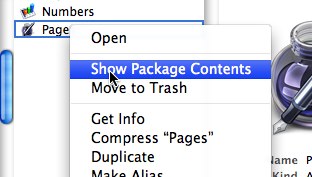 Right-click on the paid app file and click "Show Package Contents". Open up the "Contents" folder and delete _CodeSignature, _MASReceipt, and CodeResources. Now paste in the files you copied from the Twitter.app (or whatever free app you downloaded).
Step 7 You're Done!
You can now play that Angry Birds app (and any other .app file from the new Mac App Store) to your heart's content. Just repeat the steps above.Warnings
- Don't steal software. It's a crime. This guide is intended to help you restore backups of apps you've already paid for.


