Welcome To The Hacker Club 4U

On This Blog Now You can get knowledge about how to to do hacking and also Know how to prevent from hacking and know many tips And tricks of computer and internet

Hacking

Click Here To Know Many Tricks and Tips Of HACKING facebook,twitter and other accounts and passwords

Hacking Safety And Security

Click Here to know how to protect your computer and inetrnet from hacking and know hacking safety and security tips and tricks

Facebook And Twitter

Click On Picture For TWITTER And Click On This Tittle For FACEBOOK .Hacking And Security Tips Of facebook and twitter.Know how to byepass facebook login and twitter login

Gmail And Yahoo

Click On Above Picture For GMAIL Hacking And Security Tips . And.Click On This Title For YAHOO Hacking and security tips


Showing posts with label Facebook Apps And Tools. Show all posts

Facebook Layouts - How to Change Facebook Theme?

Unlike other social networking sites like Orkut, Twitter and Myspace, Facebook has not officially released features for changing your Profile Theme. Whether you like or not, you need to adjust yourself with the default theme. But using Firefox and installing add-on, you can customize the looks, colours and theme of your Facebook Profile. This however is visible only to you and not your friends.


I have got two ways of changing your Facebook profile theme. One is using the Greasemonkey Add-on and the other using the Stylish add-on. Here is how you can change your theme using either of these two:

1)Using Greasemonkey Add-on:

  • First ensure you are using Firefox browser and then install the Greasemonkey Add-on.
  • Restart firefox and Visit this page with lots of Themes.
  • Click on the favorite theme you like and install the script.
  • After you load facebook.com you can view the change the Facebook theme.
2) Using Stylish Add-on:
  • Ensure you are using Firefox and then install the Stylish Add-on.
  • Restart Firefox and repeat the process as shown in Using Greasemonkey Add-on
Apart from scripts in above listed site, you can check out these sites for other themes:
1) Some themes on Userscripts.org.
2) Facebook Fixer which enhances facebook with bigger picture, download viedeo options and more.
About Stylish Add-On


Change Facebook Theme
This is the Ferrari theme. More themes are available for you to choose.


Requirement: The basic requirement for this to work is to have Mozilla Firefox 3.5 or higher.

Steps to achieve this: The following steps should be carried out to successfully change Facebook theme.

  1. Open Mozilla Firefox and install 'Stylish' addon.
  2. Follow the basic steps to install the addon.
  3. Restart Firefox after successfully installing the Stylish addon.
  4. Login to your Facebook Account and click on the small 'S' button in your Firefox status bar.
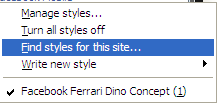
  5. Click on "Find Styles for this Site" to open a new tab with free themes to use for Facebook.
  6. Click on any theme and a preview will be shown.
  7. If everything is fine in the previewed theme, click on "Install with Stylish" button at the top right corner of the page.
  8. A dialog box will open.
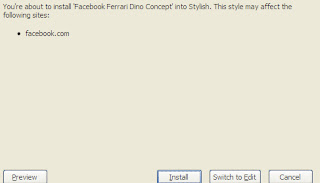
  9. Click on Install in the dialog box.
Stylish Button


facebook theme change

Install with stylish

Installing Ferrari theme for Stylish Firefox

PLEASE DON'T FORGET TO CLICK ON SUBSCRIBE BUTTON GIVEN BELOW.

Facebook Layouts - How to Change Facebook Theme?

Please Click On Subscribe Button Give Below


Unlike other social networking sites like Orkut, Twitter and Myspace, Facebook has not officially released features for changing your Profile Theme. Whether you like or not, you need to adjust yourself with the default theme. But using Firefox and installing add-on, you can customize the looks, colours and theme of your Facebook Profile. This however is visible only to you and not your friends.


I have got two ways of changing your Facebook profile theme. One is using the Greasemonkey Add-on and the other using the Stylish add-on. Here is how you can change your theme using either of these two:

1)Using Greasemonkey Add-on:

  • First ensure you are using Firefox browser and then install the Greasemonkey Add-on.
  • Restart firefox and Visit this page with lots of Themes.
  • Click on the favorite theme you like and install the script.
  • After you load facebook.com you can view the change the Facebook theme.
2) Using Stylish Add-on:
  • Ensure you are using Firefox and then install the Stylish Add-on.
  • Restart Firefox and repeat the process as shown in Using Greasemonkey Add-on
Apart from scripts in above listed site, you can check out these sites for other themes:
1) Some themes on Userscripts.org.
2) Facebook Fixer which enhances facebook with bigger picture, download viedeo options and more.
About Stylish Add-On


Change Facebook Theme
This is the Ferrari theme. More themes are available for you to choose.


Requirement: The basic requirement for this to work is to have Mozilla Firefox 3.5 or higher.

Steps to achieve this: The following steps should be carried out to successfully change Facebook theme.

  1. Open Mozilla Firefox and install 'Stylish' addon.
  2. Follow the basic steps to install the addon.
  3. Restart Firefox after successfully installing the Stylish addon.
  4. Login to your Facebook Account and click on the small 'S' button in your Firefox status bar.
  5. Click on "Find Styles for this Site" to open a new tab with free themes to use for Facebook.
  6. Click on any theme and a preview will be shown.
  7. If everything is fine in the previewed theme, click on "Install with Stylish" button at the top right corner of the page.
  8. A dialog box will open.
  9. Click on Install in the dialog box.
Stylish Button


facebook theme change

Install with stylish

Installing Ferrari theme for Stylish Firefox

Awesome News – Facebook Acquires Face.com


Facebook has acquired Face.com! Our mission is and has always been to find new and exciting ways to make face recognition a fun, engaging part of people’s lives, and incorporate remarkable technology into everyday consumer products. If you’re anything like us, Facebook is a part of your life every single day.  We keep up with our friends and family, share interesting (or mundane) experiences from our daily lives, and perhaps most importantly for us, we share a LOT of photos.


We love building products, and like our friends at Facebook, we think that mobile is a critical part of people’s lives as they both create and consume content, and share contentwith their social graph. By working with Facebook directly, and joining their team, we’ll have more opportunities to build amazing products that will be employed by consumers – that’s all we’ve ever wanted to do.  :)

Now, lots of developers use Face.com technology to power various apps and make wonderful products.  We love you guys, and the plan is to continue to support our developer community.  If there are new developments you can expect to hear from us here, on the developer blog, and through our developer newsletter.
Thank you to all of our supporters, our amazing dev community, to our employees and to our friends and family who have seen us through many long days and longer nights. The next steps are going to be exciting for all of us.

How To Scure Hacking Facebook And Twitter On Shared Computers.

    
Have You Ever accessed Facebook or Twitter in cyber cafe's or your office or your school? If Yes then there are chances that your Facebook or twitter account was hacked then and there. By the teacher, your boss or the cafe owner. 


I've discussed just this trick here. You don't need to be a programming expert from that, anyone with basic knowledge of computers can do it. 
                                                                                                           
First there's a thing maybe you have noticed already that whenever you open Facebook or twitter the web address is like "http://www.facebook.com"  and whenever you have browsed GMAIL note the difference. its like "https://www.gmail.com". So as you have seen Gmail uses a secure server to conncet to the net, while Facebook or twitter do not. 


So what you need to do is:
Download the below plugin from the below link
Download Plugin


Once Installed A sidebar would open on your Firefox browser. So that whenever people login into there account, you can easily login into there account too. The thing is that the computers must be connected through data-cable, Wifi like in cyber cafe's.
Enjoy this little hacking. And please pass comments.

TAKE ADVANTAGE OF FREE SMS FEATURE VIA FACEBOOK

Facebook fever have mushroomed in such a way in the association development. Communication between persons through facebook more interest than on other social networking sites.

Facebook fever would be even better if added with a feature such as "free SMS via Facebook." This feature will be very useful if we will chat with an offline friend. So the message will still be up to him.

Free SMS is provided by dodotext, a free SMS provider via Facebook, Friendster and dodotext mobile applications. Dodo text is an online service owned by Tactica Labs Pte Ltd Singapora origin serving GSM SMS to the number of all countries around the world for free.

To use SMS dodotext via facebook:

1. Visit Dodotext
2. Click the Facebook link in the Add Our Facebook Application
3. Log into your Facebook account
4. Press the Allow button to allow entry into the facebook application
5. Then add the application to the profile.

To start an SMS, SMS settings first destination country, destination phone number, and type your message (max 100 characters), then press the Send SMS.

Additional features for free SMS via Friendster is not much different with facebook. Whereas for use dodotext mobile SMS applications, we need to register first and will get 5 free SMS every day. Let's try it now ..!


CLICK ON BELOW BUTTON PLZ 

SOME FACEBOOK CHAT APPLICATIONS IN BLACKBERRY FOR FREE

Chat with friends on Facebook is very exciting. However, the constraints have to sit long at a computer and a limited time becomes one of the obstacles met in the pleasure with friends in cyberspace.

With the presence of the Blackberry smartphone technology, this constraint disappears. Moreover, there are some free applications that can be accessed via mobile phones blackberry. In fact, most applications are able to integrate with Blackberry messenger (BBM).

Here are some of Facebook Chat applications on Blackberry Smartphones

1. mChat 1.2.3: this application is one hundred percent free. Although free, we would not be disturbed by the ads that often appear in several free applications. Not only that, we can also update the status of this application. The file capacity is only 705 KB, so, this application can installed on blackberry mobile phone has limited memory. Download at www.blackberry.com/appworld or directly on the site www.mchat.com

2. Facebook Chat For Free: The application is very flexible in use on the blackberry because all facilities are the same as the Blackberry Messenger. In fact, we do not need to move a window (window) chat while chatting with friends on Facebook as well as fuel either, because these applications are integrated with the fuel. Download at www.blackberry.com/appworld or at: www.smarter-apps.com

3. Free Chat For Free With BBM (BBM CFF): This application can say 100 percent integrated with the fuel. Not only the looks alone, but other facilities such as autotext (OS.5) or Word Substitution (0S.6), avatar icons can also be applied here. Amazingly, this application can differentiate our chat friends who are using Blackberry while chatting or not. Download www.blackberry.com/appworld or in CFF Fuel: www.msonar.com

4. FriendChat: This application will run fine on Blackberry OS 6.0. Besides having the same facility with a variety of other facebook chat application, this application can be sent to the fuel facebook chat screen. In addition. FrienChat support multi chat system to chat with some friends on Facebook simultaneously at once. Download at www.blackberry.com/appworld or at: www.jaredcompany.com

In addition to the above four applications, facebook chat is still a lot of other applications that can be fused with a Blackberry. May be useful!


CLICK ON SUBSCRIBE BUTTON BLOW

Free Facebook Access From any Mobile In India Without Internet

Facebook has become the largest social network on this earth and day to day many people are joining Facebook for connecting with family, friends who are far away from their home. Facebook is becoming the most popular social network for chatting with family and friends, share the knowledge, exposure of any event, talk without any talk, building subscribers for business. If we talk about the registered user by countries then India has become the second largest country in the world whose people are registered with Facebook. Now Facebook has decided to attract more users from India and Facebook India has partnered with Fonetwish by which you can access your Facebook for free without any internet connection without any form of data ( EDGE/WCDMA/HSPA(3G)). You can use your Facebook in the mobile even in Nokia 1100 or no need to have any multimedia mobile or inbuilt any apps. Fonetwish has started this free Facebook access service to Airtel, Idea, Aircel and Tata Docomo users only and may be brings it to other networks. Now here is how to access free Facebook without internet connection in India.


Browse Facebook For Free In India On Mobile Phones


  1. If you are a Airtel/Aircel/Idea or Tata Docomo user, then proceed the below steps and if you are network user then wait for some days to launch this service.
  2. Dial *325# from your mobile phone and wait for a while.
  3. Enter your username and password, now are in your Facebook account.
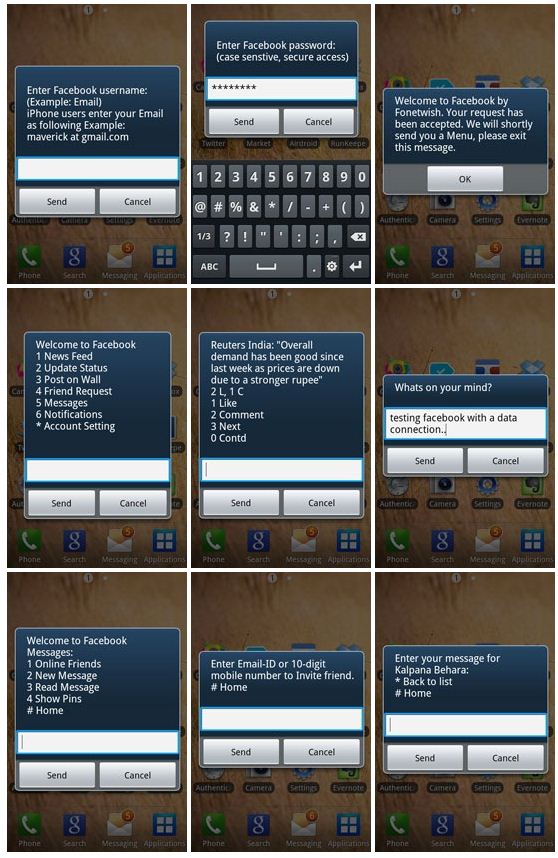
  4. Choose the number what you want to be, for example if you want to update your status update then choose 2 and go for write and update like the below preview. Take a complete look in the preview,

free facebook access in india
Free Facebook Access Screenshot taken from labnol.org
I personally used this service and have a good experienced without any problem and hope you would also like these feature into your mobile phones. You can also check who are online and chat them and also you could get direct dial number to chat with individual friend, if you are outside of your Facebook account, just you have to dial no. and message them. Using this unlimited service have minor charges, just you have to pay only Rs. 1.00/day and use this feature unlimited.

IF THIS TRICK IS HELPFUL FOR YOU THAN DON'T FORGET TO SUBSCRIBE US FOR MORE UPDATES !
Click On Subscribe Button......!

Recommend us on Google!

Share

Twitter Delicious Facebook Digg Stumbleupon Favorites More